
KaiNote Subtitles Editor 0.9.8.1292 (x64) Portable
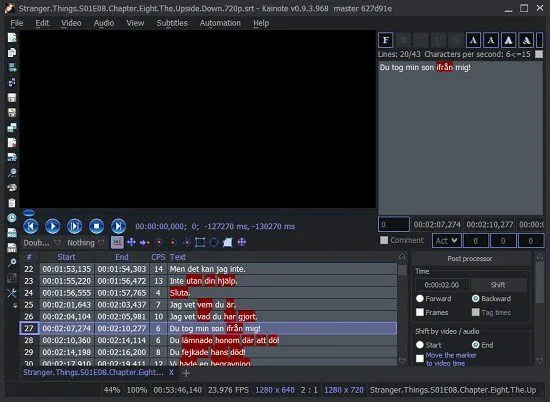
🎬 KaiNote Subtitles Editor 0.9.8.1292 (x64) Portable – Subtitle Creation & Video Caption Editing Tool
KaiNote Subtitles Editor 0.9.8.1292 is a Windows application focused on creating, editing, and synchronizing subtitles for video content. It provides tools for working with subtitle text and timing, making it useful for translators, video editors, content creators, and users preparing captions for multimedia projects.
⭐ Main Features
- ✔ Create and edit subtitle files
- ✔ Adjust subtitle start and end times
- ✔ Synchronize captions with video dialogue
- ✔ Modify subtitle text and formatting
- ✔ Work with multiple subtitle entries
- ✔ Assist with subtitle translation workflows
- ✔ Review subtitle timing and placement
- ✔ Provide tools for organizing caption sequences
- ✔ Designed for 64-bit Windows systems
📌 File Information
Software: KaiNote Subtitles Editor 0.9.8.1292 (x64) Portable.rar
File Size: 40.17 MB
Format: RAR Archive
Category: Video / Subtitle Editor / Multimedia
Platform: Windows 64-bit
📖 About KaiNote Subtitles Editor
KaiNote Subtitles Editor provides a dedicated workspace for preparing subtitle content rather than editing the video itself. Users can enter dialogue, divide captions into individual entries, and adjust their timing so that the text appears at the appropriate moments during playback.
The software can be useful when creating subtitles from scratch as well as when correcting an existing subtitle track. Timing adjustments are particularly important when captions need to remain synchronized with spoken dialogue or scene changes.
⏱ Subtitle Synchronization
Accurate timing is an important part of subtitle editing. The application provides controls for modifying the beginning and ending points of subtitle entries, helping users align captions with the corresponding portions of a video.
✍ Text & Caption Editing
Subtitle entries can be edited individually to correct spelling, punctuation, translations, or other textual issues. This makes the editor useful for preparing subtitles for different languages and audiences.
🌐 Translation Workflow
Subtitle editors are commonly used when adapting video content for viewers who speak different languages. Existing caption files can be reviewed and their text adjusted while preserving the overall timing structure of the original subtitle track.
📺 Video Caption Projects
KaiNote Subtitles Editor can be incorporated into workflows for movies, educational videos, online content, presentations, and other multimedia projects that require synchronized captions.