
FanControl V273
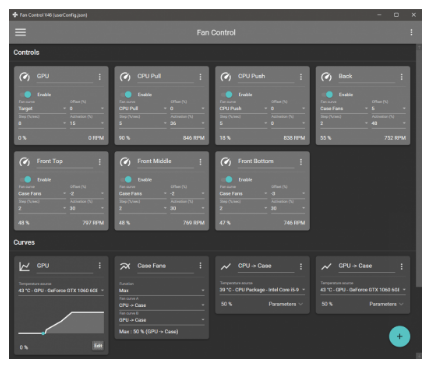
🌡 FanControl V273 – Windows System Fan Speed & Temperature Monitoring Utility
FanControl V273 is a Windows utility designed to monitor system temperatures and provide control over compatible cooling fans. It can be useful for users who want greater visibility into CPU, GPU, motherboard, and other temperature sensors while adjusting fan behavior according to their system’s cooling requirements.
⭐ Key Features
- ✔ Monitor available system temperature sensors
- ✔ Display CPU and GPU temperature information
- ✔ Control compatible system and cooling fans
- ✔ Create customized fan speed curves
- ✔ Adjust cooling behavior based on temperature levels
- ✔ Monitor fan speeds in real time
- ✔ Support multiple fan-control configurations
- ✔ Provide a centralized interface for cooling management
- ✔ Help balance cooling performance and fan noise
- ✔ Useful for desktop PC monitoring and thermal management
📌 File Information
Software: FanControl V273.zip
File Size: 11.57 MB
Format: ZIP Archive
Category: System Utilities / Hardware Monitoring / Fan Control
Platform: Windows
📖 About FanControl V273
FanControl V273 provides a centralized way to monitor hardware temperatures and manage compatible cooling fans from Windows. Instead of relying only on automatic motherboard fan profiles, users can configure fan behavior according to their preferred cooling strategy.
The utility can be useful for gaming PCs, workstations, and other systems where temperature management and fan noise are important considerations. By monitoring available sensors, users can better understand how their cooling system responds to different workloads.
🌡 Temperature Monitoring
FanControl can display information from supported temperature sensors, helping users keep track of thermal conditions during normal operation or demanding workloads. Monitoring CPU, GPU, and other available sensor readings can provide a clearer picture of overall system cooling performance.
🔥 Custom Fan Curves
One of the main functions of the application is configuring fan speeds according to temperature changes. Custom curves can be used to make fans respond more aggressively when temperatures increase or operate more quietly during lighter workloads.
This provides users with greater control over the relationship between system temperature, cooling performance, and acoustic levels.
⚙ Cooling Management
The software can be particularly useful when a computer’s default fan behavior does not provide the preferred balance between cooling and noise. Users can review available fan controls and configure supported devices according to their system’s requirements.
📊 Why Use FanControl?
For users who want more control over PC cooling, FanControl offers temperature monitoring and configurable fan management in one interface. It can assist with maintaining suitable temperatures while avoiding unnecessary fan activity during less demanding workloads.