
GeekUninstaller 1.5.5.185
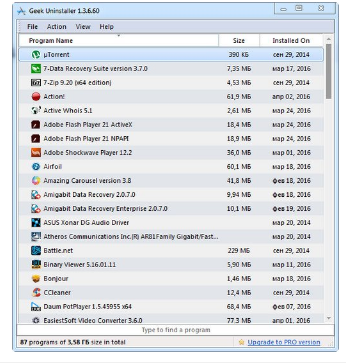
🧹 Geek Uninstaller 1.5.5.185 – Lightweight Software Removal Utility
Geek Uninstaller 1.5.5.185 is a lightweight Windows utility designed to remove installed applications and help users clean up leftover files and entries associated with uninstalled programs. Its simple interface focuses on straightforward application management and removal.
🗑️ Program Uninstallation
Geek Uninstaller provides a simple way to locate installed applications and remove unwanted programs from a Windows computer without unnecessary interface complexity.
🔍 Application Search
The software includes tools for quickly finding installed applications, making it easier to locate specific programs when managing a large list of installed software.
🧹 Leftover Cleanup
After removing a program, Geek Uninstaller can help identify remaining files, folders, and registry-related entries associated with the uninstalled application for additional cleanup.
💥 Force Removal
The utility includes a force-removal option for situations where a program’s standard uninstaller is unavailable, damaged, or unable to complete the removal process normally.
📂 Installed Software Management
Users can browse applications installed on the system and access available information and removal options from a centralized program list.
📋 Application Details
Geek Uninstaller can display useful information about installed software, helping users identify applications before deciding whether they should be removed.
🚀 Portable Utility
The application is distributed as a compact executable utility, making it convenient for users who prefer a lightweight software-management tool without a complicated installation process.
🖥️ Windows Compatibility
Geek Uninstaller is designed for Windows systems and focuses specifically on managing and removing desktop applications from the operating system.
📋 File Information
Software: GeekUninstaller 1.5.5.185.zip
File Size: 3.1 MB
Format: ZIP Archive
Category: Uninstaller / System Utilities / Software Management
Platform: Windows